 Suuudokuuu
Challenge a Friend at Sudoku
Updated
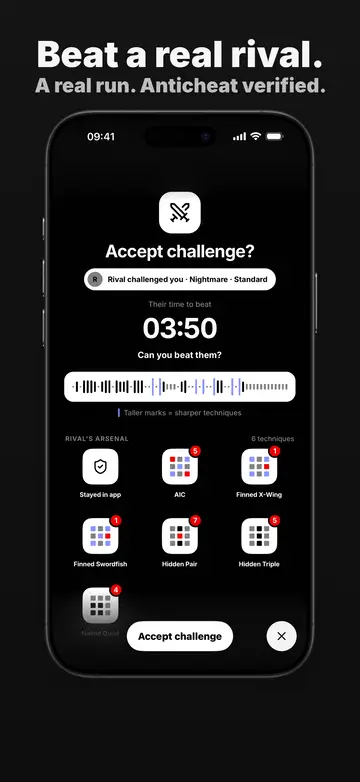
In Suuudokuuu you can send a friend the exact puzzle you solved, with your recorded run attached. They play the same grid and race your time move for move, with no account and no server in between: the whole challenge travels inside one share link.
How a challenge works
- Record a run. Turn on Challenge mode on the Home screen and solve a puzzle. Challenge runs cannot be paused, and they note when you leave the app.
- Send the link. From the replay screen of a finished challenge run, tap the challenge button. The share sheet sends a link with the message “I completed this Sudoku in” and your time, followed by “Can you beat me?”.
- Race the recording. The friend opens the link, sees the rival’s time, the timeline of their moves and the techniques they used, and accepts. During the race the app shows whether you lead or the rival is ahead.
- Compare the result. The result screen says whether you beat your rival, were slower or tied, and by how much, and puts both runs side by side.
Rating and fairness
Every shared puzzle carries its rating on the Sudoku Explainer scale, so a friend knows what they are accepting before they start. How that number is measured is explained in the sudoku difficulty rating guide. Because a challenge run is recorded rather than self-reported, the time to beat is the rival’s actual solve.
Sharing a plain puzzle
If you only want to send a puzzle, with no run to beat, the share button on a normal game sends the puzzle itself. The link opens in the app if it is installed, and on the web otherwise.
After the race
Finished challenges are kept like any other game, so you can replay them move by move and see your results in your progress.
Open Suuudokuuu

Challenge a friend FAQ
Does my friend need an account?
No. The puzzle and your recorded run are encoded in the link itself, and Suuudokuuu has no account system.
Does my friend need the app?
The link opens in the app when it is installed. Otherwise it opens the web version, which works in a browser.
Can I pause a challenge run?
No. Challenge runs cannot be paused, and the recording notes when you leave the app, which keeps the time to beat honest.